Limb Animation Blueprint
Every detached limb runs an Animation Blueprint whose parent class is UEGoreSystemAnimInstance. That class holds the captured pose (Detached_Snapshot) and turns physics on only after the graph has applied it.
If this Blueprint is missing, targets the wrong skeleton, or does not read the snapshot, the limb will pop to reference pose, hang invisible, or simulate from a T-pose.
Shipped examples
The plugin already includes Animation Blueprints for the UE4 mannequin and MetaHuman skeletons. Point Global Anim Instance at one of those if you use that skeleton, or duplicate one for your own.

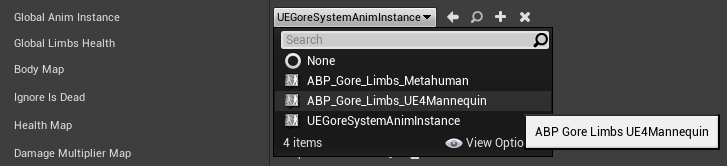
Create one for a new skeleton
- Content Browser → Animation → Animation Blueprint.
- Parent Class:
UEGoreSystemAnimInstance(notAnimInstance). - Target Skeleton: the same skeleton the limb mesh uses.
- Do not use the + next to the class picker on the component. That does not create an Animation Blueprint.
Open the AnimGraph.
Required node
Add Pose Snapshot.
- Snapshot name / pose: bind it to
Detached Snapshot(theFPoseSnapshotonUEGoreSystemAnimInstance). - Connect the result to Output Pose.
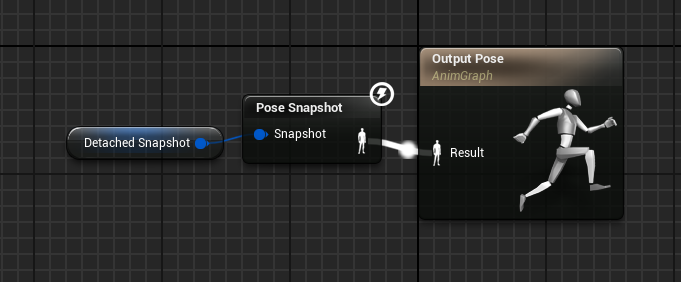
You can copy the graph from the mannequin or MetaHuman example and assign your skeleton.
This AnimInstance is responsible for positioning the mesh correctly, including after physics is enabled.
Checklist
- Parent class is
UEGoreSystemAnimInstance. - Skeleton matches the spawned mesh (pre-cut limb or auto-cloned character).
- Pose Snapshot is in the AnimGraph and reads
Detached_Snapshot. - Global Anim Instance on the component points at this Blueprint.
- The mesh has a Physics Asset.
Mixamo / custom rigs
Same steps. The skeleton must have a usable root and a Physics Asset. Video: Auto dismemberment , any skeleton.
Control Rig characters
The character still uses its own AnimBP / Control Rig. The limb still needs this snapshot AnimBP. They are not the same asset.
For the character side, add Gore Update to the Control Rig and enable Control Rig Procedural. See Control Rig and Lyra.