Gore Settings
Every detachable bone, effect, sound, and health override lives on UEGoreSystem → Gore Settings (FUEGoreSystemSettings). This page is the full reference.
The component also has a few flags above Gore Settings (debug, physics asset, automation). Those are documented first.
Component flags
Enable Debug Logging
Prints spawn, snapshot, and hide events to the Output Log (LogUEGoreSystem). Leave this off in shipping.
Default Physics Asset
Optional override. If set, detached limbs clone this Physics Asset instead of the one on the skeletal mesh. Use it when the character PA is too dense, or when you want a dedicated “limbs only” PA.

Automation
These only matter if you want the plugin to carve a whole mesh instead of swapping in pre-cut limb meshes. Full walkthrough: Auto dismemberment.
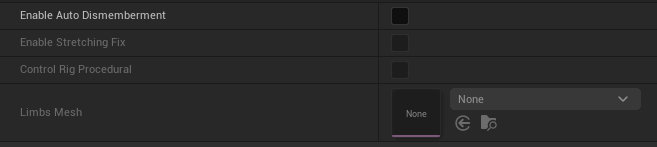
| Property | What it does |
|---|---|
| Enable Auto Dismemberment | When a Body Map entry has no Mesh, spawn a clone of the character mesh and hide everything that is not that limb. |
| Enable Stretching Fix | Extra work so a non-separated skin does not rubber-band after hide. Small CPU cost. |
| Control Rig Procedural | Hide / collapse through the Gore Update Control Rig node instead of HideBoneByName. Required for Lyra-style setups. See Control Rig. |
| Limbs Mesh | Optional wounded / cavity mesh used for the spawned limb instead of the live character mesh. |
Global Effects
Used for every bone unless that Body Map entry has Override Effects checked.
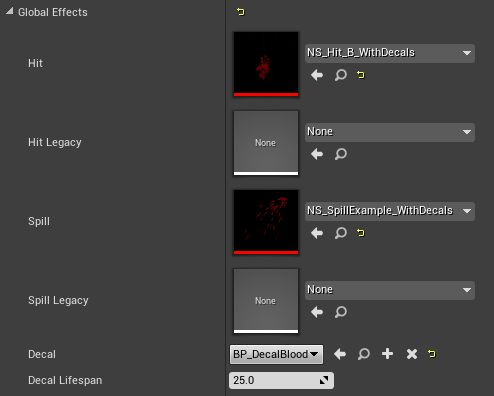
| Property | When it plays |
|---|---|
| Hit | Niagara spawned when the character is hit |
| Hit Legacy | Cascade equivalent (legacy) |
| Spill | Niagara spawned and attached when a bone breaks |
| Spill Legacy | Cascade equivalent (legacy) |
| Decal | Decal actor spawned when Hit or Spill is generated |
| Decal Lifespan | Seconds before decals are removed |
If Override Effects is true on a bone and you leave those pointers empty, nothing spawns for that bone. That is intentional (silent / dry break).
Global Sounds
Same override rules as effects.
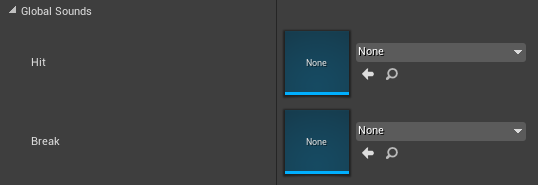
| Property | When it plays |
|---|---|
| Hit | Cue played when the character is hit |
| Spill | Cue played when a bone breaks |
Global Anim Instance
Anim Instance class used on every spawned limb. It must derive from UEGoreSystemAnimInstance.
You need one Animation Blueprint per skeleton. UE4 Mannequin and MetaHuman examples already ship with the plugin.
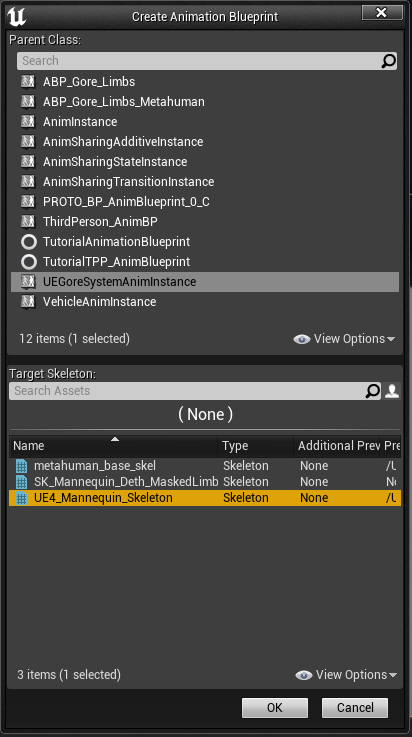
Do not press the + next to the class picker. That creates a raw C++-style Blueprint, not an Animation Blueprint. Create it from the Content Browser: Animation → Animation Blueprint, parent class UEGoreSystemAnimInstance, target skeleton matching the limb mesh.
The AnimGraph needs a Pose Snapshot node that reads Detached_Snapshot. Step-by-step: Limb AnimBP.
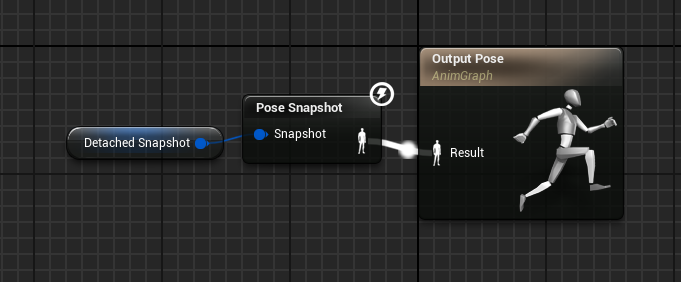

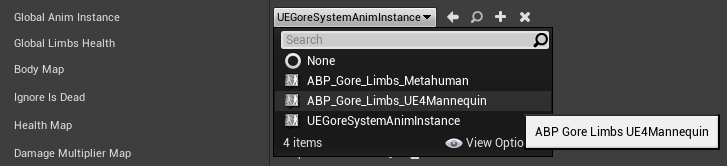
This class is responsible for applying the captured pose before physics starts. If it is missing or wired wrong, the limb pops to ref pose or hangs invisible.
Global Limbs Health
Default hit points for every bone in Body Map. 1.0 means a single ApplyGoreDamage(1.0, …) will empty the limb (after multipliers).
Override individual bones with Health Map.

Body Map
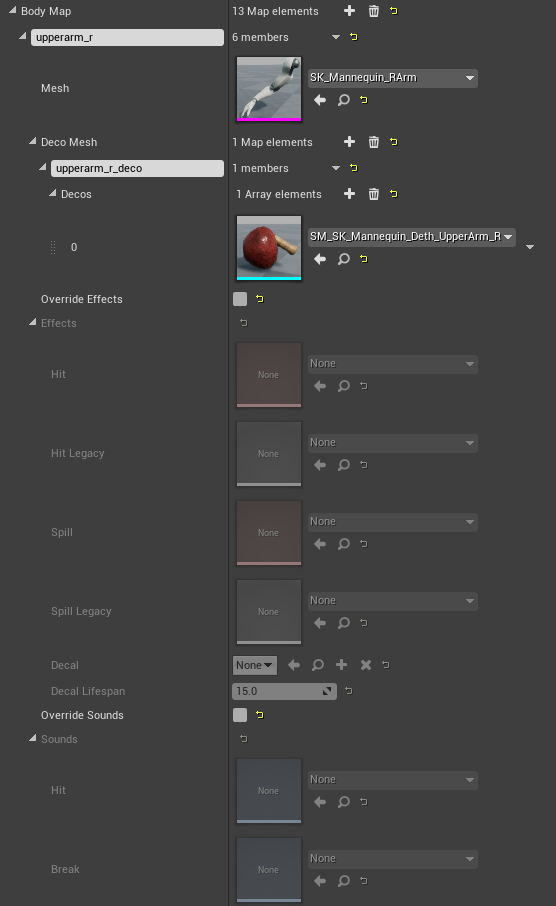
The list of bones the system is allowed to damage and detach. The key is the bone name. The value is FUEGoreSystemStruct.
| Field | Role |
|---|---|
| Mesh | Skeletal mesh spawned as the detached limb. Leave empty to hide the bone only, or to use auto dismemberment (clone of the character / Limbs Mesh). |
| Materials Override | Optional per-slot materials on the spawned limb. Unset slots copy from the visual mesh. |
| Deco Mesh | Map of socket name → array of static or skeletal meshes spawned on detach and attached to that socket. Put deco sockets on the parent bone. See Sockets. |
| Override Effects / Effects | Per-bone Niagara / Cascade / decal. Empty + override = no FX. |
| Override Sounds / Sounds | Per-bone hit and break cues. |
| Detached Mesh | Runtime only. Pointer to the spawned component after a break. Read it with GetDetachedMeshFromBoneName. |
A bone that is not in this map is invisible to ApplyGoreDamage, DamageBone, and DestroyBone.
Ignore Is Dead
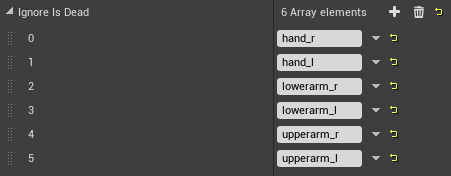
Bones that can detach while the character is still alive. Everyone else requires Is Dead == true on ApplyGoreDamage.
Typical entries: hands, lower arms, ears, a helmet bone.
Health Map
Per-bone override of Global Limbs Health.

Damage Multiplier Map
Multiplies incoming damage for that bone. Example: head = 2.0 doubles head damage.
NewHealth = Current − (Damage × Multiplier)
DamageApplied = Damage × Multiplier

Collision
| Property | Default | Used for |
|---|---|---|
| Limbs Collision Profile | Ragdoll |
Spawned limb after physics starts. |
| Deco Collision Profile | NoCollision |
Flesh / cavity decoration meshes. |
| Decal Collision Channels | WorldStatic, WorldDynamic | Channels the decal trace tests. |



The profile names must exist in Project Settings → Collision. If Ragdoll is missing, detached limbs fall through the world or refuse to simulate.
You can copy Gore Settings from a sample character in the plugin content and paste it onto yours, then fix bone names for the new skeleton.